Reply के लिए कस्टम डोमेन कैसे काम करते हैं?
Reply आपको अपने स्वयं के डोमेन का उपयोग करके ईमेल भेजने और प्राप्त करने देता है, जैसे help@yourcompany.com.
डोमेन कनेक्ट करने के लिए, Reply > Settings > Channels > Email inboxes पर जाएं और आवश्यक DNS रिकॉर्ड जोड़ने के चरणों का पालन करें।
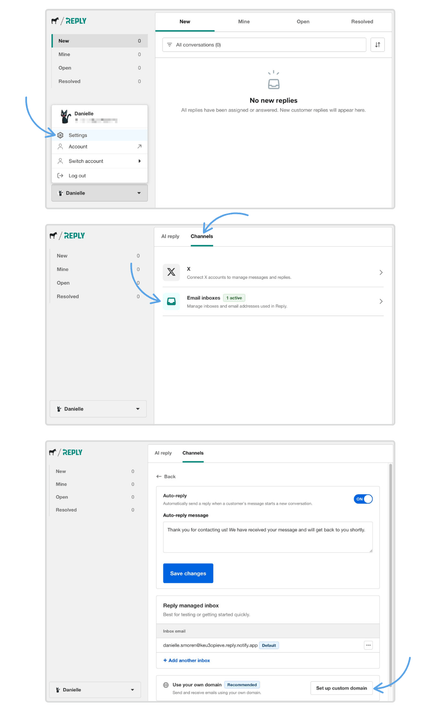
एक बार आपका डोमेन सत्यापित हो जाने के बाद, आप इसका उपयोग Reply में ईमेल इनबॉक्स बनाने के लिए कर सकते हैं।
यदि आपने पहले से Notify में डोमेन सत्यापित कर लिया है, तो Reply इसे स्वचालित रूप से पहचान लेगा और आपको इसे फिर से सत्यापित करने की आवश्यकता नहीं होगी।
DNS परिवर्तनों के प्रसार में कुछ समय लग सकता है। यदि आपका डोमेन पेंडिंग रहता है, तो पुष्टि करें कि आवश्यक DNS रिकॉर्ड सही ढंग से जोड़े गए थे।
कमैंट्स